What is PGP and what is a PGP Key?
One of the biggest areas of concern for internet users, investigators and criminals alike, is that of privacy. As investigators, it is important that we protect the integrity of our investigations by keeping confidential information secure. This is why it is important the be familiar with encryption such as PGP which stands for “Pretty-Good-Privacy”. We need to take enhanced privacy steps online to help protect the integrity of the information we are sharing or storing online. To do this, we rely on encryption, which is a subset of cryptography.
According to Wikipedia.com:
PGP is used for signing, encrypting, and decrypting texts, e-mails, files, directories, and whole disk partitions and to increase the security of e-mail communications. Phil Zimmermann developed PGP in 1991. 1
A lot has happened with PGP over the years but now PGP is is part of a framework called OpenPGP and generally uses RSA encryption, which is considered one of the strongest encryption mechanisms currently in place.
Okay where do the keys come in?
In order to encrypt and decrypt data and text PGP uses two sets of keys, a private key and a public key. Think about your private key being your social security number, you shouldn’t disclose your social security number to anyone, it is just for your to know in order to validate who you are. A public key is like your name, you can shout it at the rooftops and give it out to everyone, but only you should know your social security number or private key.
Steps of Encryption
- If I wish to write a secret email to my friend Chad, I first need to know what his public key is. Keys can be found in a number of ways, there are key repositories online such as MIT’s public key server here. However, anyone can upload keys to the server, so the best way to confirm a persons public key is by obtaining it directly from the person themselves.
- Using the persons public key I write my email or encrypt the file I wish to send to them. Once the text or data is encrypted, I am no longer able to edit or change the data intended for Chad. The only person that can decrypt the file is Chad himself.
- I send the encrypted text or file to Chad using any method I choose. I could even store the encrypted text online in a public repository or website such as PasteBin
- I direct Chad to the location where the encrypted text or data is located. Chad goes to the location and retrieves the data or text, and he is able to decrypt it with his private key on his computer. Chad’s private key is most likely secured using a password or passphrase as well which increases his security in the event his private key is copied or stolen.
- Chad is able to decrypt the information and read the text or view the files which were sent to him with high confidence that no other person has viewed the message or files other than he and I.
How do I learn more about this?
There are learning resources everywhere online for PGP encryption, YouTube has several videos on the topic and there is even a subreddit you can join and exchange messages online with other Reddit users located here.
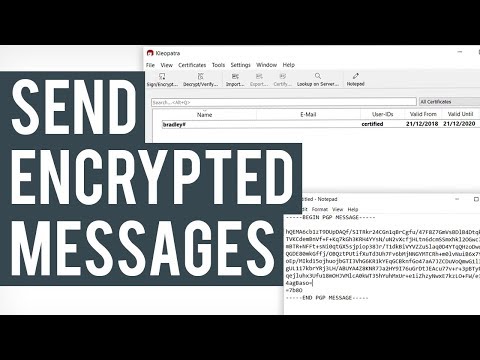
Below is a YouTube video I found helpful on the topic, you can also stay tuned to my blog. I had written a walkthrough on a different blog and will be adapting it for this site shortly.
Feel like you have it down?
Here is my PGP Key, feel free to send me a message and try it out!
-----BEGIN PGP PUBLIC KEY BLOCK-----

mQENBGBqcg4BCACw6E6Z2AFYj0uzy4Z4oJxttykDCEeWJWNnnC3k4ujXA+axe60V
3KVBp6uk8lBRnUgYDv/C/TdIwHHjn2Mqa3RqyBHZX3BkXE3rAsMmWpxTLIyKmPeJ
haubpjyWw/AjXdTP10SS+1/v184piROsWMwrStBaJHiYq/8xhubRx68lEEdtag0g
0byL/yxr/zF6rwuUew2AUQ2+N86NFwZSo7mvH2AwwoIEPC308+fCilWv38OmEZ4U
iHnaj/dHHbiGmSMRw2nT/KaQHkq78DMDwepLiyKF5InuZtkCdqagQ0suRTtWgFOa
uvFQABtRo2AnBts5fXbv99aduldwMV8ZyV81ABEBAAG0JElPVERldGVjdGl2ZSA8
cmljaEBpb3RkZXRlY3RpdmUubmV0PokBTgQTAQgAOBYhBFohY5GvueSVXY5+yNx2
0xxDDEvUBQJganIOAhsDBQsJCAcCBhUKCQgLAgQWAgMBAh4BAheAAAoJENx20xxD
DEvU1PwH+wTwpRxRtc2qWU5TJH8MoFMwDkt9PDdMvbA51v3eqlTBXlKY3VpB2Tsq
kFQ8R+JN4KmGTWS3ZM5uF+XnNjnPtqhJYcG2mJ5sG3JuX7q65xhtgXnE2oX22dDS
OOhar6rOn1S8ep+mhdGYrMufr7QDyHlJU9f9e/tkdzd8L4uUhcfeQzOdrPn1MyNu
Oiia6frmPf27Q+zaZMErnNOkKarP6pwmZF2gFC5PA3mZswJygFszApMSaTMIvxxU
U7cbfaga/01TNNEf7VQ791jYTmCpOUgDnZrWSKs+bPIaD2bHsIUEiG3ZPI6FRsEm
0ng/s8MfTjYpwlE/06bipcvChhi4PCG5AQ0EYGpyDgEIAJyJr2rC8wvPdrccIa66
RGGTy6HOyDvbqovNghYibb0FkSGB3y7MSuX7SCzEbzvcT8Xxf7QKLN1YMmsgZzwx
X7xnvEFDfRLv4H881XPgOGzw6MZzgUhDF4z6vn+yLCa69SpOTyWuwzNddTTWtrIf
w+vMM884gao/IpHLAYGTuCF9Oe7T70sIPmMj1CZIOtpjK8SC08gJsdPnborIr+Od
glIjkHldgWFwOksrfmP5Pmm+OESxV6c3Sg6MVakp9c9YEGep5NhqkFY6HEIfoOoL
wPNPnhb/xJVWjXuqomcW3IcocVsWwQlSs6/fWC11pcAFStv4b4THBJ3otWGMjEhK
bqEAEQEAAYkBNgQYAQgAIBYhBFohY5GvueSVXY5+yNx20xxDDEvUBQJganIOAhsM
AAoJENx20xxDDEvUfxUH/iI06nm+yaWHoKD6ECq2OP64qIXAV7qPXo7+VBRq2MRP
oz208fGxnPQtXBxkK8BNESmW09Qw/Z2H0Azffb/GmPMZxcy6r/9imw99jxcxXaZ+
AU34anF3gn5+ULGEuK9fH81mEBnC52MgU9qvam+JR1HB1DfJfYE20UrWDNiUqYjk
6ZCuSbZs84ewvAaJS3gjacmvSRyqRXrxjnnRDo60AyZy9ueOrnAbsRpy0HUpjBcm
L8Sgh6VvLeAntEypHJekYqXVLwrRvAMfx7AbwKkhfxKU9AW1nF8ybE/brOtvpKrh
xlBOU0VAZfxUK66+/xql4YmodTzIgp0kwjUYM9HaJIY=
=DXws
-----END PGP PUBLIC KEY BLOCK-----
Pretty Good Privacy - Wikipedia. (2022) Retrieved November 27, 2022, from https://en.wikipedia.org/wiki/Pretty_Good_Privacy ↩︎